Welcome to Support Center
Find instant answers to your questions regarding property buying, selling, rentals, listings, and your account.
User Profile (10 questions)
1. Is creating an account on envesttville.com FREE? How to do it?
Yes, signing up on envesttville.com is completely FREE.
Step 1: Click on “Login” button on the top right corner of the website homepage.
Step 2: Click on “Sign Up” link to go to sign up page.
Step 2: Enter your full name, valid email address, phone number, and create a secure password.
Step 3: Click Submit to receive an OTP verification code on your provided email address.
Step 4: Enter the OTP to verify your account. Once verified, your account will be created successfully, and you will be directed to your personalized Dashboard where you can post listings, manage inquiries, compare properties etc.
For Agents/Consultants/Builder/Developer – Registration is handled offline to ensure proper verification.
Please contact our onboarding team:
📞 +91 9355850566
📧 india.sales@envesttville.com
(Mon – Sat, 10 AM – 6 PM)
2. Do you need to register to post a Property on envesttville.com?
Yes, if you are a new user, you will have to register before you can post your Property on envesttville.com
3. Do you need to submit any kind of documents to register as a Buyer/Seller/Tenant/Property Owners on envesttville.com?
No, you do not need to submit any documents to register on envesttville.com
4. Can you use a Mobile number to create multiple accounts on envesttville.com?
No, a phone number can only be linked to one account. So, if you are already registered on envesttville.com with a phone number, you cannot use the same number for creating a new user account.
5. What benefits a Seller/Owners/ Property Managers can get on envesttville.com?
- Sign up & explore the website for FREE
- Owner/Seller/Property Manager – List 10 Properties for FREE till 1st Dec 2026
- Owner/Seller/Property Manager – List 2 Properties for FREE after that
- Smart CRM tool to manage leads in one dashboard
- Upload multiple photos and detailed property information per listing
- Showcase your property for sale or rent to the right audience
- Check responses and connect with buyers/tenants easily
- Connect with a curated network of verified users and listings
6. I forgot my password. How to reset new password?
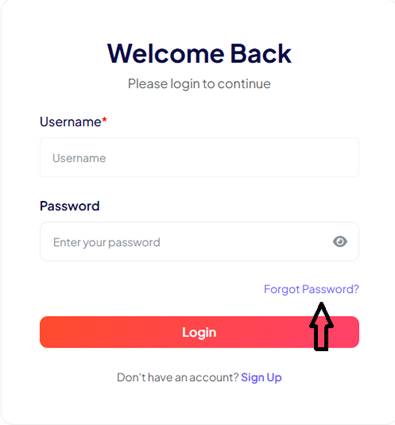
If you have forgotten your password, follow below steps to set new password:
- Click on “Forgot Password?” link on login page
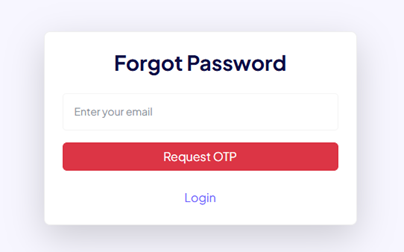
- Below new page will appear, enter your email id and click on “Request OTP”
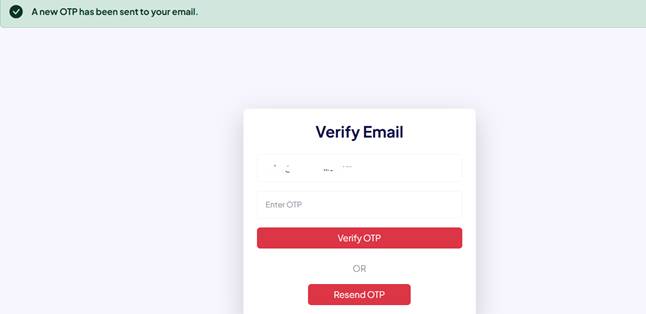
- OTP will be sent to your email, enter OTP and click on “Verify OTP” button
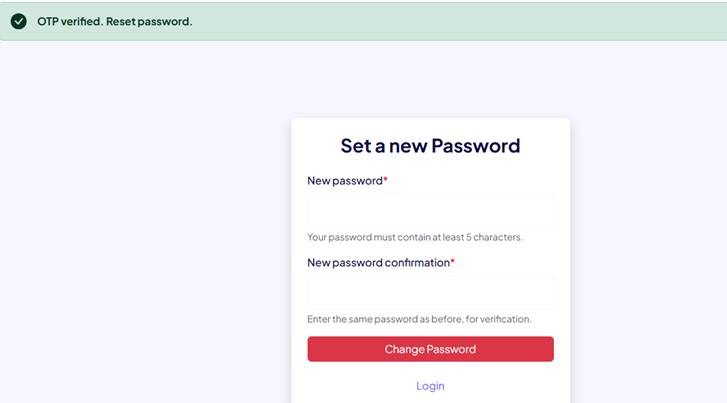
- Once OTP verified, you can set a new password. Choose your new password and click on “Change Password” button
7. What benefits a Buyer/Tenant can get on envesttville.com?
- Sign up & explore the website for FREE
- Buyer/Tenant – Get 10 contacts of Owner/Seller for FREE till 1st Dec 2026
- Buyer/Tenant – Get 2 contacts of Owner/Seller for FREE after that
- User dashboard to manage and monitor all Recent seen properties, Wishlist, Viewed contacts
- Compare up to 3 properties side by side at once for FREE and make better decision
8. What should I do if the platform blocks my login because my account is marked as inactive?
Your account may have been marked as inactive due to a prolonged period of no login activity. If you wish to reactivate your account, please contact our support team at support@envesttville.com
9. Can I log in without my email id?
No, email id is must for login on envesttville.com
10. I'm generating OTP but I'm not getting the OTP on my registered email. How can I fix this?
OTP messages are transmitted via third-party network providers, and delivery failures are typically caused by local network issues.
If this is a recurring problem, please contact us at support@envesttville.com
In the meantime, you can attempt to resolve this by clicking 'Resend OTP' to request a new OTP.