Welcome to Support Center
Find instant answers to your questions regarding property buying, selling, rentals, listings, and your account.
Response Management (7 questions)
1. What will be the response on FREE listings?
Being a FREE Listing, limited responses for the property will be visible in your account. Upgrade to a subscription plan to instantly push your property to the top of search results and attract more buyers/tenants.
2. Where can I view the leads received for the listed property?
Follow the steps below to view leads received on listed property:
Step 1: ‘Login’ to your account.
Step 2: Go to 'Dashboard' and then to ‘Listings’
Step 3: Under ‘Listings’ you will find an option ‘Leads’
Step 4: Click on ‘Leads’ to view all the enquiries received on your listed property.
3. What is the use of “Viewed Contacts” feature?
Buyers/Tenants can use the feature to keep a track of all the contacts they viewed while using the platform. The contact information and property IDs an user has viewed get stored at one place for the ease of the user.
4. How many leads can I get if I post a free listing?
The standout feature of envestville.com is that there are no caps on leads for free listings on our platform.
5. How many leads will I receive for my property listing? Will the leads be genuine?
A key feature of envesttville.com is that we do not provide a flood of fake or useless inquiries, nor do we distribute the same lead to multiple users. On our platform, you receive genuine leads from parties who are truly interested, and a lead is directed only to the specific property listing for which interest was shown.
6. I am getting little to no feedback on my listed property. What should I do?
Response rates depend on what buyers/tenants are searching for, but you can always improve your chances. Follow these quick tips and posting suggestions to get noticed and maximize your property leads.
- Ensure your property is competitively priced to attract serious buyers and tenants.
- Add good quality property photos and videos
- Give the location information of the listed property properly
- Always highlight the unique features of the property to attract buyer/tenant
- Give in-depth property details with neighbourhood amenities like schools, hospitals, market etc.
7. How to contact the property owner, seller or an agent on envestville.com?
Please follow below steps to get connected:
Step 1: Click on the Property card in which you are interested
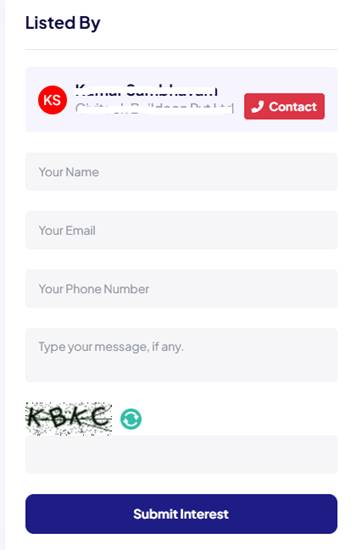
Step 2: The Property detail page or Listing detail page will open. On right corner, you will find the “Contact” button
Step 3: Click on “Contact” button. You will get the contact number of Owner/Seller/Agent, and you can contact them immediately by calling.
Step 4: Additionally, there is a contact form below that you can use to send your queries, though the response time might be slightly slower.