Welcome to Support Center
Find instant answers to your questions regarding property buying, selling, rentals, listings, and your account.
All Questions & Answers
User Profile
Guide for signup, login, reset password, profile management and account settings.
1. Is creating an account on envesttville.com FREE? How to do it?
Yes, signing up on envesttville.com is completely FREE.
Step 1: Click on “Login” button on the top right corner of the website homepage.
Step 2: Click on “Sign Up” link to go to sign up page.
Step 2: Enter your full name, valid email address, phone number, and create a secure password.
Step 3: Click Submit to receive an OTP verification code on your provided email address.
Step 4: Enter the OTP to verify your account. Once verified, your account will be created successfully, and you will be directed to your personalized Dashboard where you can post listings, manage inquiries, compare properties etc.
For Agents/Consultants/Builder/Developer – Registration is handled offline to ensure proper verification.
Please contact our onboarding team:
📞 +91 9355850566
📧 india.sales@envesttville.com
(Mon – Sat, 10 AM – 6 PM)
2. Do you need to register to post a Property on envesttville.com?
Yes, if you are a new user, you will have to register before you can post your Property on envesttville.com
3. Do you need to submit any kind of documents to register as a Buyer/Seller/Tenant/Property Owners on envesttville.com?
No, you do not need to submit any documents to register on envesttville.com
4. Can you use a Mobile number to create multiple accounts on envesttville.com?
No, a phone number can only be linked to one account. So, if you are already registered on envesttville.com with a phone number, you cannot use the same number for creating a new user account.
5. What benefits a Seller/Owners/ Property Managers can get on envesttville.com?
- Sign up & explore the website for FREE
- Owner/Seller/Property Manager – List 10 Properties for FREE till 1st Dec 2026
- Owner/Seller/Property Manager – List 2 Properties for FREE after that
- Smart CRM tool to manage leads in one dashboard
- Upload multiple photos and detailed property information per listing
- Showcase your property for sale or rent to the right audience
- Check responses and connect with buyers/tenants easily
- Connect with a curated network of verified users and listings
6. I forgot my password. How to reset new password?
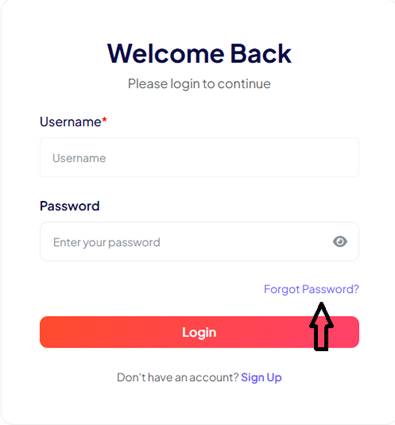
If you have forgotten your password, follow below steps to set new password:
- Click on “Forgot Password?” link on login page
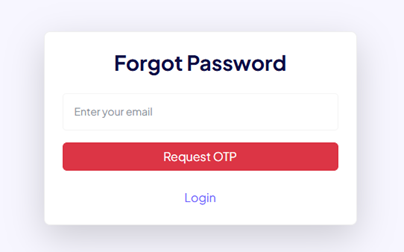
- Below new page will appear, enter your email id and click on “Request OTP”
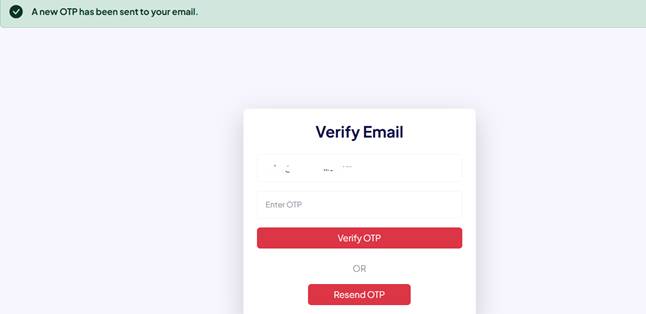
- OTP will be sent to your email, enter OTP and click on “Verify OTP” button
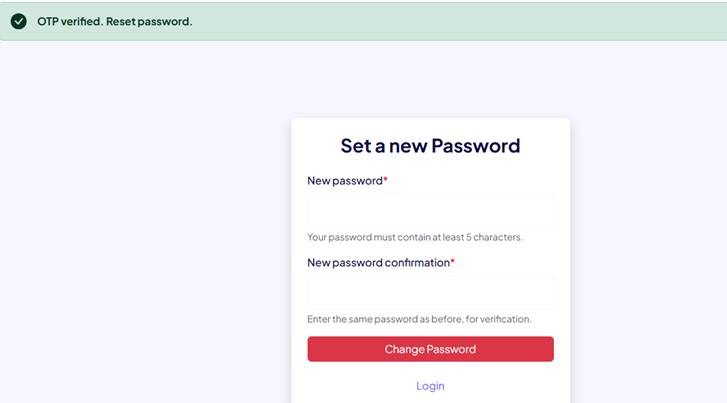
- Once OTP verified, you can set a new password. Choose your new password and click on “Change Password” button
7. What benefits a Buyer/Tenant can get on envesttville.com?
- Sign up & explore the website for FREE
- Buyer/Tenant – Get 10 contacts of Owner/Seller for FREE till 1st Dec 2026
- Buyer/Tenant – Get 2 contacts of Owner/Seller for FREE after that
- User dashboard to manage and monitor all Recent seen properties, Wishlist, Viewed contacts
- Compare up to 3 properties side by side at once for FREE and make better decision
8. What should I do if the platform blocks my login because my account is marked as inactive?
Your account may have been marked as inactive due to a prolonged period of no login activity. If you wish to reactivate your account, please contact our support team at support@envesttville.com
9. Can I log in without my email id?
No, email id is must for login on envesttville.com
10. I'm generating OTP but I'm not getting the OTP on my registered email. How can I fix this?
OTP messages are transmitted via third-party network providers, and delivery failures are typically caused by local network issues.
If this is a recurring problem, please contact us at support@envesttville.com
In the meantime, you can attempt to resolve this by clicking 'Resend OTP' to request a new OTP.
Property Management
Guide for Posting property, Edit/Update property details, Visibility of property on website, Deactivate/Reactivate listed property, Compare property
1. Can you post property on envesttville.com for FREE? How many properties you can post for FREE?
Yes, envesttville.com offers 2 FREE listings to owners/sellers for posting properties in general. However, we are giving a special offer of 10 FREE listings to owners/sellers up to 1 Dec 2026.
2. How to post property for FREE on envesttville.com?
How it works:
Step 1: Click on “Post Property” button on homepage.
Step 2: Sign up on envesttville.com
Step 3: Go to “Dashboard” and choose appropriate option – Rent/Sell under “Listings”
Step 4: Click on “Add Listing” button, the form will appear to enter your property details.
Step 5: Post your property Ad for FREE by entering in depth property details and upload multiple good quality pictures.
Step 6: Click on “Save & Next” button at the bottom of the page.
Step 7: Start getting enquiries on user dashboard
3. Is RERA ID must for posting properties on envesttville.com?
Under the Real Estate (Regulation and Development) Act (RERA), a RERA ID is mandatory for all new and ongoing commercial and residential real estate projects where the total land area exceeds 500 square meters, or the total number of apartments/units is more than 8.
Projects That Must Have a RERA ID
- Residential Projects: Apartments, flats, row houses, villas, and plotted developments that cross the size or unit limits.
- Commercial Projects: Office spaces, retail shops, and commercial buildings exceeding 500 sq. meters or 8 units.
- Mixed-Use Projects: Any building or development combining both residential and commercial spaces that meets the area or unit threshold.
- Ongoing/Incomplete Projects: Projects that were incomplete when the RERA act came into force.
- Phased Developments: Each phase of a larger project is treated as an independent project and requires its own separate registration.
Properties Exempt From RERA
- Small projects with a land area under 500 square meters or 8 or fewer total units.
- Properties where renovation, repair, or re-development is done without any new allotment or sale of units.
- Projects that already received a completion certificate before the RERA rules became operational.
4. For how long a listed property will be visible on website?
FREE Listings are visible for a limited time period as given in trial pack. Your property will not appear in search results after that. To showcase your property in search results again, you would have to subscribe to our paid packages.
5. When will the property become visible on site?
Once the posting is done, the listed property appears immediately on the site.
6. How to Edit/Update property details?
Follow the steps below to update the PROPERTY details:
Step 1: ‘Login’ to your account.
Step 2: Go to 'Dashboard' and then to ‘Listings’
Step 3: You will find a card of your Property under Rent OR Sell – according to the previous listing done.
Step 4: Click on ‘Update’ button to make the new changes.
Step 5: Once all changes are made, click on ‘Update’ button at the bottom of the page.
7. How to deactivate/reactivate the listed property?
Follow the steps below:
Step 1: ‘Login’ to your account.
Step 2: Go to 'Dashboard' and then to ‘Listings’
Step 3: You will find a card of your Property under Rent OR Sell – according to the previous listing done.
Step 4: Click on ‘Update’ button to make the new changes.
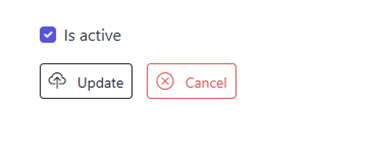
Step 5: Go to the option ‘Is active’ at the bottom of the page to deactivate/reactivate the listed property on the website. If the option is ticked as below, the property will appear on the website and if you remove the tick, the property will not appear on the website.
8. How to use the “Compare Properties” feature?
Follow the steps below:
Step 1: Just click on the “Add to compare” button appearing on the top of the property images.
Step 2: You can select maximum 3 properties at once to compare.
Step 3: Once selected, click on the ‘Compare Properties’ button at the top right corner of the website.
Step 4: New page will appear showing comparison of the selected properties.
Step 5: User can also hide the common features by clicking on ‘Hide Common Features’ button.
Response Management
Guide for Capturing, routing, tracking, and replying to inbound leads and inquiries from prospective buyers & sellers.
1. What will be the response on FREE listings?
Being a FREE Listing, limited responses for the property will be visible in your account. Upgrade to a subscription plan to instantly push your property to the top of search results and attract more buyers/tenants.
2. Where can I view the leads received for the listed property?
Follow the steps below to view leads received on listed property:
Step 1: ‘Login’ to your account.
Step 2: Go to 'Dashboard' and then to ‘Listings’
Step 3: Under ‘Listings’ you will find an option ‘Leads’
Step 4: Click on ‘Leads’ to view all the enquiries received on your listed property.
3. What is the use of “Viewed Contacts” feature?
Buyers/Tenants can use the feature to keep a track of all the contacts they viewed while using the platform. The contact information and property IDs an user has viewed get stored at one place for the ease of the user.
4. How many leads can I get if I post a free listing?
The standout feature of envestville.com is that there are no caps on leads for free listings on our platform.
5. How many leads will I receive for my property listing? Will the leads be genuine?
A key feature of envesttville.com is that we do not provide a flood of fake or useless inquiries, nor do we distribute the same lead to multiple users. On our platform, you receive genuine leads from parties who are truly interested, and a lead is directed only to the specific property listing for which interest was shown.
6. I am getting little to no feedback on my listed property. What should I do?
Response rates depend on what buyers/tenants are searching for, but you can always improve your chances. Follow these quick tips and posting suggestions to get noticed and maximize your property leads.
- Ensure your property is competitively priced to attract serious buyers and tenants.
- Add good quality property photos and videos
- Give the location information of the listed property properly
- Always highlight the unique features of the property to attract buyer/tenant
- Give in-depth property details with neighbourhood amenities like schools, hospitals, market etc.
7. How to contact the property owner, seller or an agent on envestville.com?
Please follow below steps to get connected:
Step 1: Click on the Property card in which you are interested
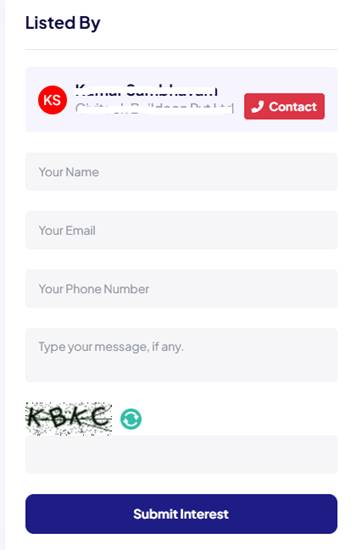
Step 2: The Property detail page or Listing detail page will open. On right corner, you will find the “Contact” button
Step 3: Click on “Contact” button. You will get the contact number of Owner/Seller/Agent, and you can contact them immediately by calling.
Step 4: Additionally, there is a contact form below that you can use to send your queries, though the response time might be slightly slower.
Buying Guide
Everything you need to know before purchasing residential or commercial properties.
1. What is RERA, and why is it mandatory to check?
The Real Estate (Regulation and Development) Act, 2016 (RERA) protects homebuyers from developer fraud and project delays. Always check if the property has a valid RERA registration number on your state's official RERA portal. Buying a non-RERA registered property carries severe risks of construction delays and legal litigation.
2. How do I check if a real estate project is registered under RERA?
To check if a real estate project is registered under RERA, you can visit the official RERA website of the respective state or union territory and search for the project using its registration number or details.
3. What is the difference between Carpet Area, Built-Up Area, and Super Built-Up Area?
Understanding area definitions prevents you from paying for space you cannot legally use:
- Carpet Area: The actual usable area inside the apartment where you can lay a carpet (excludes wall thickness and common areas).
- Built-Up Area: The carpet area plus the thickness of inner/outer walls and balconies.
- Super Built-Up Area: The built-up area plus your proportionate share of common areas like lobbies, lifts, stairs, and clubhouses. Builders often price flats based on this metric.
5. What are the taxes and fees associated with buying a property in India?
The taxes and fees associated with buying a property in India include stamp duty, registration charges, Goods and Services Tax (GST) on under-construction properties, and property tax.
Stamp duty and registration charges vary from state to state.
6. What documents are essential for property registration in India?
The standard paperwork needed to register a property in India generally consists of the sale deed, ownership title records, identity and address proofs for both buyers and sellers, PAN cards, and recent passport-sized photos.
7. Which legal documents must I verify before purchasing a property?
Never buy a home without verifying these primary title records:
- Title Deed: Confirms the seller holds actual ownership of the land.
- Registered Sale Deed: The primary legal document that transfers property ownership from a seller to a buyer after being officially recorded at the local Sub-Registrar's office under the Registration Act, 1908.
- Mutation certificate: An official revenue or municipal document used to update property ownership records when a property is sold, gifted, or inherited
- Encumbrance Certificate (EC): Proves the property is free of legal liability or pending bank loans.
- Commencement & Completion Certificates: Issued by local municipal authorities to verify the construction adheres to local building bylaws.
8. How to check if a property has any pending legal issues or disputes?
To find out if a property has active court cases or ownership conflicts, you can hire a legal professional to perform a due diligence check. This process includes scanning judicial records, running property registry searches, and authenticating ownership papers.
Furthermore, if you apply for a bank home loan, the financial institution will handle this entire legal investigation on your behalf before approving the funds.
9. How to choose location before purchasing a property?
Location of your property is very vital as your quality of life will depend on the location you choose for your home. Always choose location based on:
- Ease of commute
- Connectivity with your workplace
- Presence of neighbourhood amenities like schools, hospitals & markets
- Return on investment
- Safety & security
10. What are the different property types?
Under Construction – Basic elements of Under construction properties are:
- Suitable for investors
- Property value – Below market rate
- Safety of Money – High risk
- Hand over date – Expect delays
- Build quality – Can only be verified at the time of possession
- Social and physical infrastructure – Can only be verified at the time of possession
- Profit potential – Very High
- Loan facility – Varies with projects
Ready to move – Basic elements of Ready to move properties are:
- Suitable for End users
- Property value – Above market rate
- Safety of Money – Secure
- Hand over date – Immediate
- Build quality – Can be verified before purchase
- Social and physical infrastructure – Mostly present
- Profit potential – Low return on investment
- Loan facility – Easily available
Resale– Basic elements of Resale properties are:
- Suitable for End users & Investors
- Property value – At market rate
- Safety of Money – Secure
- Hand over date – Immediate
- Build quality – Can be verified before purchase
- Social and physical infrastructure – Mostly present
- Profit potential – Normal
- Loan facility – Easily available
11. What is the process for obtaining a home loan from Indian banks or financial institutions?
The process for obtaining a home loan from Indian banks or financial institutions typically involves the following steps:
1. Pre-qualification: Determine your eligibility and borrowing capacity.
2. Application: Submit the required documents, including income proof, identity proof, address proof, and property documents.
3. Verification: The bank verifies your documents and assesses your creditworthiness.
4. Approval: Upon approval, the bank issues a loan sanction letter with the loan amount, interest rate, and repayment terms.
5. Disbursement: The loan amount is disbursed directly to the seller or builder, or as agreed upon in the property transaction.
Some banks offer up to 90% of the plots value and 80% of the flat value as loan.
12. What is the importance of the Occupancy Certificate (OC) in Indian real estate?
An Occupancy Certificate (OC) is an official paper given by local city authorities to confirm that a property's construction is finished according to the cleared blueprints and is ready for people to live in. It serves as proof that the structure adheres to all relevant building laws and safety standards.
13. What is the process for purchasing property as a non-resident Indian (NRI)?
Non-Resident Indians (NRIs) face specific regulations and constraints when purchasing real estate in India. While they are permitted to acquire both commercial and residential properties, these transactions must strictly comply with the terms and boundaries established by the Foreign Exchange Management Act (FEMA) and the Reserve Bank of India (RBI).
14. What are the restrictions on NRI property ownership in India?
Foreign property laws restrict Non-Resident Indians (NRIs) from directly purchasing farmhouses, agricultural fields, or plantations in India. Even so, they can still legally own these specific properties if they receive them as an inheritance or through a legacy bequest.
15. What makes more sense Buying or Renting?
Prior to choosing between buying and renting, a thorough financial analysis is essential. If there is any possibility of purchasing a property, look into available down payment and home loan options. Although renting might appear cost-effective initially, monthly rental payments yield zero long-term returns.
16. When is the stamp duty supposed to be paid?
A stamp duty tax applies to almost every property ownership transfer. This fee is determined by the total market value of the real estate and changes depending on the specific city where the transaction occurs.
17. Can a property with an active mortgage be placed under a sale agreement with a buyer? What are the specific operational steps and legal modalities required to complete such a deal?
When dealing with a mortgaged property, the outstanding bank loan must be addressed first. The primary requirement is to settle the remaining debt to clear the title before transferring and registering the property in the buyer's name. Alternatively, a simultaneous execution can be arranged, where the seller, the buyer, and the lending bank concurrently sign the transaction documents to close the loan and register the deed at the same time.
Selling Guide
Learn how to list, market and sell your property quickly.
1. How is Capital Gains Tax calculated on property sales?
When you sell a property, the profits are taxed as Capital Gains:
- Short-Term Capital Gains (STCG): If sold within 24 months of purchase. Profits are added to your total income and taxed according to your applicable slab rate.
- Long-Term Capital Gains (LTCG): If sold after 24 months. The standard taxation rate is 20% with indexation benefits (which adjusts your purchase cost against price inflation).
2. How can I legally save on Capital Gains Tax?
Sellers can save or completely exempt themselves from paying LTCG tax under specific sections of the Income Tax Act:
- Section 54: Reinvest the capital gains amount into purchasing another residential property within two years (or construct one within three years).
- Section 54EC: Invest the profit amount (up to ₹50 Lakhs) into specified government-backed bonds like NHAI or REC within six months of the sale.
3. What is the difference between Market Rate and Circle Rate?
- Circle Rate: The minimum government-set valuation at which a property can be registered in a specific locality. Stamp duty is paid based on this value. Property transactions cannot legally be recorded below the circle rate.
- Market Rate: The actual market price a buyer is willing to pay based on local demand-supply dynamics, infrastructure, and property condition.
4. What should you consider before selling a property?
Here is a comprehensive breakdown of everything you need to review for a successful sale:
- Analyse Local Comparables: Research the final transaction prices of similar homes in your specific neighbourhood rather than relying strictly on active listing prices.
- Leave room for price negotiation: Always price the property with a minor buffer, as buyers usually expect a counter-offer during closing discussions.
- Audit the paperwork: Gather your sale deed, title deed, mutation certificate, encumbrance certificate and approved building plans.
- Obtain clearance documents: Get an official No-Objection Certificate (NOC) from your housing society or local municipal authority.
- Complete essential repairs: High Return on investment maintenance work should be completed like plumbing leaks, paintings, dampness on the walls or any structural flaws that can heavily damage your bargaining power if left unfixed.
5. When is the best time for selling a property?
Generally festive seasons are considered most preferred time in India. Also, people consider buying new property around the closing of the financial year.
6. How to sell property online?
Build an effective real estate listing with a clear, well-crafted description. Keep sentences short and direct to emphasize the property's unique selling points (USPs). Highlight key details like specific property features, transit links, and nearby retail or social hubs. Enhance the listing by uploading multiple high-quality photos and videos.
7. Which is more preferrable between renting and selling a property?
Choosing to rent or sell depends on your preference for steady monthly income versus immediate capital. Renting generates long-term wealth and passive revenue. Selling provides instant liquidity and eliminates property management responsibilities.
When to Rent:
• Passive Income: Generates predictable monthly cash flow to offset expenses or boost earnings.
• Long-Term Growth: Retains ownership of the asset while its market value appreciates over time.
• Future Flexibility: Keeps the property available in case you decide to move back later.
When to Sell:
• Instant Capital: Provides a substantial lump sum to pay down debt or fund major life goals.
• Zero Management Stress: Eliminates landlord responsibilities like maintenance and tenant tracking.
• Market Timing: Capitalizes on peak market prices to avoid future downturns and maintenance costs.
Rental Guide
Guide for tenants and landlords on rental agreements and leasing.
1. What are the important factors to consider before renting a home?
The most critical factor to consider before renting a home:
- Budget: Total monthly cost of the home is within your budget or not.
- Neighbourhood Amenities: Locate nearby grocery stores, pharmacies, hospitals, fitness centres, schools and parks.
- Commute times: Check the proximity to your workplace, public transit options, and daily traffic patterns during rush hour.
- Safety: Visit the neighbourhood at different times, especially at night, to check safety, security and street lighting.
2. Why are rent agreements in India usually for 11 months?
Most residential rent agreements are capped at 11 months to bypass rigid tenancy laws. Under the Indian Registration Act of 1908, any lease exceeding 12 months must be mandatory registered at the sub-registrar office, incurring heavy stamp duty. An 11-month agreement functions as a simple license that can be easily renewed without complex registration fees.
3. For renting a flat in a housing society what documents does a tenant need to submit to the society office?
You must generally provide a copy of the registered rental agreement, your Aadhaar/PAN card, and proof of police verification.
4. Who is responsible for paying the monthly society maintenance charges?
Legally, the landlord is responsible for the society's upkeep dues. However, many rental arrangements state that the tenant will pay this directly. This must be explicitly clarified in your rental contract.
5. What is a security deposit generally asked by the owners while renting?
A security deposit is an upfront fee charged by landlords in addition to monthly rent, primarily used to cover potential property damage caused by the tenant. If damages occur, the landlord will subtract the repair costs from this fund. The remaining balance is then refunded to the tenant upon moving out or terminating the lease. While typically equivalent to one or two months' rent, this amount can vary based on state regulations.
6. Does a tenant have access to all the amenities provided in a housing society ?
Tenants typically gain access to society amenities—such as parking, the clubhouse, the gym, and the swimming pool—by paying a specific fee determined by the maintenance committee. Because this fee can vary between owners and tenants, it is highly recommended to explicitly list all accessible amenities and their corresponding rates in the rent agreement to prevent future conflicts.